
Before the question of price comes a different one: do you want to use something or build something? The answer decides which part of the market is even relevant for you – and whether you have to think about databases at all.
Two categories worth keeping apart
Product descriptions tend to blur an important distinction:
- Ready-made assistants – software you install and use. You upload documents and ask questions.
- Building blocks – databases and libraries that developers use to build a solution.
Anyone looking for an assistant for their documents needs the first category. The database is already inside it, and you do not have to decide about it.
The two categories are not an either-or. In between sit programming toolkits that take much of the work off your hands, and hosted services where the provider handles the looking-up entirely. The two poles are enough to get your bearings; in practice many solutions end up somewhere between them.
Ready-made assistants
A selection of common representatives, not a complete market overview:
- Nextcloud Assistant with Context Chat – for anyone already running Nextcloud. Processing and database run in your own installation, access can be limited to individual folders; for good performance a graphics card in the server is recommended (Nextcloud, Autoize).
- AnythingLLM – open source, free of charge, to be run on your own hardware. Brings the database with it, has rights management per workspace and works with local as well as cloud models (gewusst:KI).
- Open WebUI – likewise open source and free of charge, more broadly positioned: more model connections, stronger user management, document search as one function among several (Local AI Master).
- Microsoft 365 Copilot – if your documents are in SharePoint and OneDrive anyway, this is the route with the least setup effort. The processing takes place at the provider.
- Google NotebookLM – good for individual research collections, less so for a permanent company-wide body of material; runs exclusively at Google (ki-rundschau).
With ready-made assistants, what matters most is the place where your documents are processed. The feature lists resemble each other more closely than the answer to the question of whose server is doing the work.
With Nextcloud, AnythingLLM and Open WebUI your documents stay on your own infrastructure – which regularly tips the balance where personnel and customer data are involved. With Copilot and NotebookLM they sit with the provider; that is not bad in itself, but it does belong in a clean contractual arrangement.
Building blocks for your own solutions
Relevant when something is developed individually. Sorted by purpose:
For keyword search you often need nothing new at all. PostgreSQL, MySQL and practically every common system come with a full-text search; anyone wanting more convenience takes OpenSearch or Solr. These tools have been in use for decades and are cheap to run.
For meaning-based search vector databases come into play. Here too a selection – the market is larger than this and on the move:
| Tool | Where it fits |
|---|---|
| LanceDB | Runs embedded – like a file next to the application, with no server of its own and no Docker. Open source under Apache 2.0, with bindings for Python, JavaScript and Rust (LanceDB). The simplest way into a local knowledge base. |
| Qdrant | A fully grown search database: meaning-based, keyword-style and hybrid search plus extensive filters, open source under Apache 2.0 (Qdrant). Can be started locally and moved onto a server later. |
| pgvector | An extension for PostgreSQL. If you run PostgreSQL anyway, full-text and meaning-based search sit in the same system. |
| Chroma | Popular for prototypes, quick to get started with. |
| FAISS | Not a complete database but a very fast library for similarity search from Meta Research (FAISS). Splitting, metadata, storage and updating you build yourself – which is why it is rarely the first choice for new projects. |
One possible order for getting started: simple and local → LanceDB, has to carry production later → Qdrant, control everything yourself → FAISS. Anyone running PostgreSQL anyway sensibly starts with pgvector.
How something like this is connected to an AI assistant
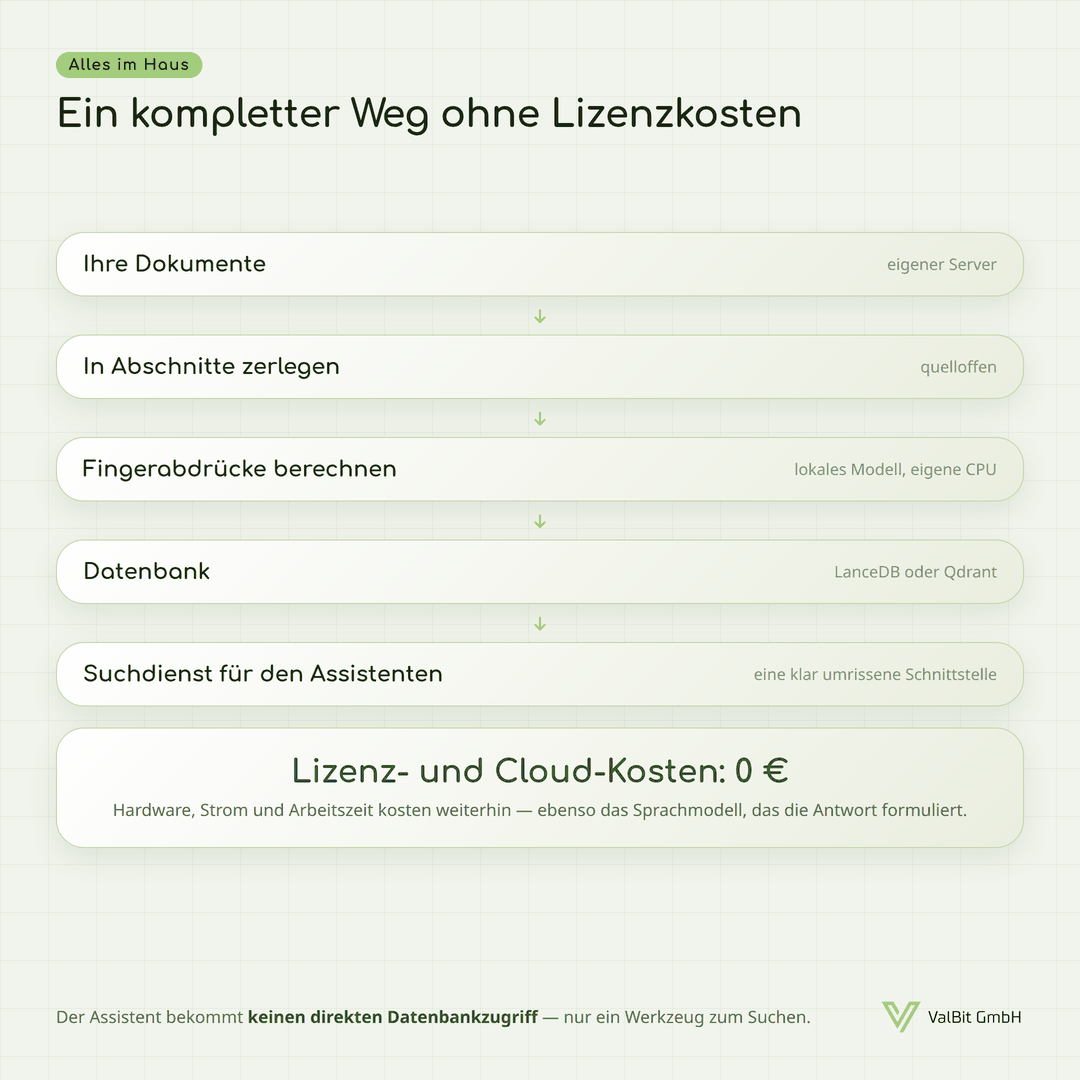
For in-house development a clean pattern has established itself: the assistant gets no direct database access but a clearly defined tool – “search the knowledge base”, say. Behind it sits a small service that does the looking-up and returns the passages found. With Claude Code the official route for this is MCP, a standardised interface for external tools and data sources (Anthropic: MCP).
The advantage: the assistant can only search, not work freely in the database. Rights, filters and logging sit in one place.
What carries no licence fee
Apart from Microsoft 365 Copilot and Google NotebookLM, all the tools named above are open source: on your own hardware there is no fee for the software. On top of that come permanently free cloud tiers (as of 08/2026), such as a Qdrant Cloud cluster with 0.5 vCPU, 1 GB RAM and 4 GB of storage – according to the provider enough for around 1 million vectors with 768 dimensions (Qdrant Cloud) – or Pinecone Starter with up to 2 GB of storage and 5 indexes (Pinecone).
The fingerprints do not presuppose a paid service either: embeddings can be calculated locally with free models on your own CPU, and Qdrant and LanceDB explicitly support this (Qdrant client, LanceDB Embeddings). That way the complete route from document to answer stays in the house.
What you should budget for all the same
- Computing power for the fingerprints – computing time on your own hardware, a fee at the provider. Does not apply with plain keyword search.
- The language model for the answer – per request or as a server of your own with a graphics card.
- Working time for setup and upkeep. In our experience the largest item.
- Hardware and electricity if everything runs in your own house. Depending on the size of the model, a graphics card in the server is needed.
Depending on the undertaking, further items come on top, such as training or an external data protection review.
Our recommendation
The first step is order, not retrieval (see part 3): tidy up, work with it, and watch where things stick.
If retrieval then becomes necessary, start small: one bounded area where the same questions come up often – work instructions, product documentation, contracts. Not “all the company’s documents”. Check the answers against the sources cited, on a sample basis; that way you quickly notice whether the way you split things up and the search method are any good.
And anyone already running Nextcloud or PostgreSQL has a good part of the toolkit in the house already.
The series at a glance
That completes the series – from the question of what RAG actually is through to the tools and the items that come with them.
Sources
- Nextcloud Admin Manual: Context Chat · Deep Dive Nextcloud Context Chat (Autoize) – local processing, folder limits
- AnythingLLM (gewusst:KI) · AnythingLLM vs Open WebUI (Local AI Master) · Building RAG locally (ki-rundschau) – ready-made solutions, where NotebookLM fits
- LanceDB: FAQ on the OSS edition – embedded, Apache 2.0, Python/JavaScript/Rust (retrieved 14 August 2026)
- Qdrant (project page) · Qdrant Cloud: create a cluster · Qdrant Python client – forms of search, free cluster, local embeddings
- FAISS (Meta Research) – library for similarity search
- LanceDB: Embeddings – support for local embedding models
- Anthropic: connect Claude Code to tools via MCP – connecting external data sources
- Pinecone pricing – free starter tier (retrieved 14 August 2026)